Sooner or later every developer meets a number like 1704067200 in an API response, a log line or a database column and has to work out which moment it means. It looks random, but it is a precise point in time written in a format that computers handle very well: a Unix timestamp.
This guide explains what the number counts, how to tell seconds from milliseconds, why time zones and daylight saving cause so many bugs and what the Year 2038 problem is. Every conversion shown here was calculated by running real code, and you can check any value yourself with the Timestamp Converter.
What a Unix timestamp is
A Unix timestamp is the number of seconds that have passed since 00:00:00 UTC on 1 January 1970. That starting point is called the Unix epoch. The count is the same everywhere in the world at the same instant. The value 0 is the epoch itself, positive values are later and negative values are earlier, so -86400 is 31 December 1969, exactly one day before the epoch.
Take the number from the introduction. 1704067200 divided by 86,400, the number of seconds in a day, is exactly 19,723 days, and 19,723 days after 1 January 1970 is 1 January 2024. So 1704067200 means 2024-01-01 00:00:00 UTC.
Computers like this format because a single integer is compact, easy to sort and simple to calculate with. To find out how far apart two events are, you subtract the numbers. 1704153600 - 1704067200 is 86400, which is exactly one day. No calendars, month lengths or leap years are involved.
Seconds, milliseconds, microseconds and nanoseconds
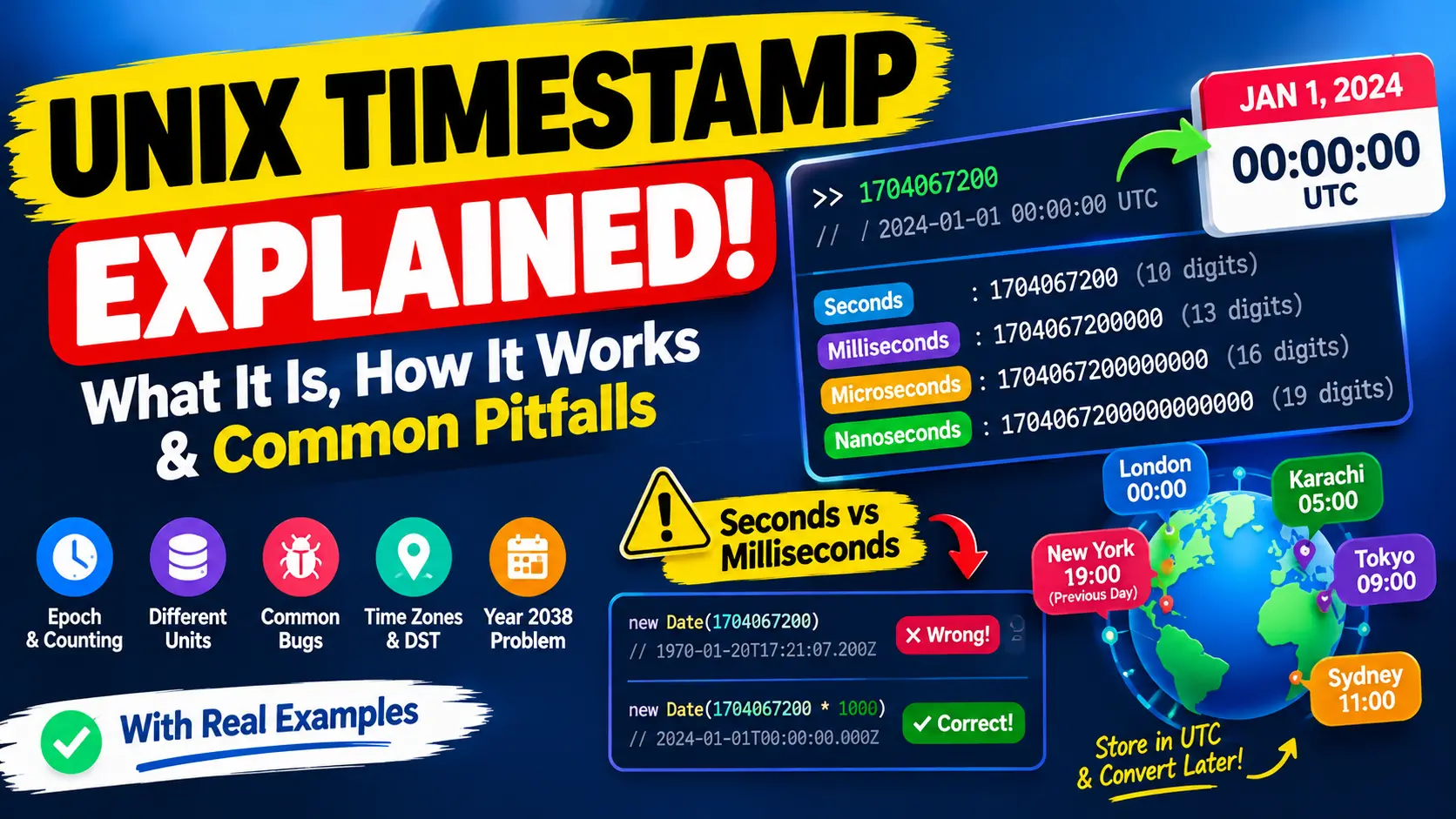
The classic Unix timestamp counts seconds, but many systems count smaller units to get more precision. They all measure from the same epoch and only the unit differs. Here is one moment, 1 January 2024 at 00:00:00 UTC, in four units:
- Seconds (10 digits):
1704067200 - Milliseconds (13 digits):
1704067200000 - Microseconds (16 digits):
1704067200000000 - Nanoseconds (19 digits):
1704067200000000000
The digit count is the quickest way to recognise the unit. A timestamp in seconds has 10 digits for every date between 9 September 2001 and 20 November 2286, and the same dates have 13 digits in milliseconds. A timestamp in seconds that you read today begins with 17 and will reach 1.8 billion in January 2027.
Which unit you meet depends on the system:
- Seconds: Unix and Linux tools such as
date +%s, PHP'stime(), Python'stime.time()(as a decimal number with fractions), many databases, and theiatandexpfields of a JSON Web Token. - Milliseconds: JavaScript's
Date.now(), Java'sSystem.currentTimeMillis(), and many web APIs and mobile SDKs. - Microseconds: some databases and tracing tools.
- Nanoseconds: Go's
time.Now().UnixNano()and high-resolution tracing and metrics systems.
The most common bug: mixing up seconds and milliseconds
If you give a value in seconds to code that expects milliseconds, the date lands in January 1970. If you give milliseconds to code that expects seconds, the year is tens of thousands in the future. These are real results from JavaScript:
new Date(1704067200).toISOString()
// "1970-01-20T17:21:07.200Z"    seconds read as milliseconds

new Date(1704067200 * 1000).toISOString()
// "2024-01-01T00:00:00.000Z"    correct

new Date(1704067200000 * 1000).toISOString()
// "+055969-09-28T00:00:00.000Z"  milliseconds multiplied again: the year 55,969
A date in the first weeks of 1970 almost always means a value in seconds was read as milliseconds. A date in the far future means the opposite. The fix is to multiply by 1000 or divide by 1000 at the point where the two systems meet.
The best protection is to put the unit in the name. Compare these two fields from an API response:
{"created": 1704067200, "updated_ms": 1704067200000}Anyone reading the second field knows at once that it is in milliseconds, and nobody has to count digits.
A timestamp has no time zone, a date does
A Unix timestamp identifies one exact instant. A time zone only changes how that instant is written as a calendar date and a clock time. The value 1704067200 is shown like this around the world:
- UTC: 1 Jan 2024, 00:00:00
- London: 1 Jan 2024, 00:00:00
- Karachi: 1 Jan 2024, 05:00:00
- Tokyo: 1 Jan 2024, 09:00:00
- Sydney: 1 Jan 2024, 11:00:00
- New York: 31 Dec 2023, 19:00:00, which is the previous day and the previous year
Daylight saving time adds another trap. In New York on 10 March 2024 the clocks jumped forward. The timestamp 1710053999 is 01:59:59 in winter time, and the very next second, 1710054000, is 03:00:00 in summer time. Every local time between 02:00 and 03:00 did not exist that day. In autumn the opposite happens and one hour occurs twice, so a local time alone can point to two different instants.
That is why the safest habit is to store and exchange times in UTC and to convert to a local time zone only when you show a value to a person.
Turning a date into a timestamp, and the traps
Going from a date to a timestamp is where many bugs start. Two things catch people in JavaScript.
First, months are counted from zero. Date.UTC(2024, 0, 1) / 1000 gives 1704067200, which is 1 January. Date.UTC(2024, 1, 1) / 1000 gives 1706745600, which is 1 February, not January.
Second, a date string without a time zone is read in the local time of the computer. These results come from a machine set to Karachi time, UTC+5:
Date.parse("2024-01-01T00:00:00Z") / 1000       // 1704067200  Z means UTC
Date.parse("2024-01-01T00:00:00+05:00") / 1000  // 1704049200  explicit offset
Date.parse("2024-01-01T00:00:00") / 1000        // 1704049200  no zone: local time
Date.parse("2024-01-01") / 1000                 // 1704067200  date only: read as UTC
The same text without a zone gives 1704049200 in Karachi and 1704067200 on a computer set to UTC. That is a difference of 18,000 seconds, or five hours, from identical input. Always write a zone, either Z for UTC or an offset such as +05:00. The standard format for this is described in RFC 3339.
Getting and converting timestamps in common tools
JavaScript (see also the MDN documentation for Date):
Date.now()                                  // current time in milliseconds
Math.floor(Date.now() / 1000)               // current time in seconds
new Date(1704067200 * 1000).toISOString()   // "2024-01-01T00:00:00.000Z"
Date.UTC(2024, 0, 1) / 1000                 // 1704067200
Python:
import time, calendar
from datetime import datetime, timezone

time.time()                                            # current time in seconds, as a float
datetime.fromtimestamp(1704067200, tz=timezone.utc)    # 2024-01-01 00:00:00+00:00
calendar.timegm((2024, 1, 1, 0, 0, 0))                 # 1704067200
In Python, always pass tz=timezone.utc. A datetime without a time zone is treated as local time, which gives the same kind of five-hour surprise as in the JavaScript example above.
Databases:
-- SQLite
SELECT datetime(1704067200, 'unixepoch');   -- 2024-01-01 00:00:00

-- PostgreSQL
SELECT to_timestamp(1704067200);

-- MySQL
SELECT FROM_UNIXTIME(1704067200);
PostgreSQL and MySQL display the result in the time zone of the current session, so check that setting if the hour looks off.
Command line and spreadsheets:
date +%s                     # current timestamp in seconds
date -u -d @1704067200       # GNU date: show a timestamp in UTC

Excel or Google Sheets, with the timestamp in cell A1:
=A1/86400+DATE(1970,1,1)     # then format the cell as date and time
=A1/86400000+DATE(1970,1,1)  # the same for milliseconds
The Excel formula works because a spreadsheet counts days. 1704067200 / 86400 is 19,723 days, and adding the date serial for 1 January 1970 (25,569) gives 45,292, which Excel shows as 1 January 2024.
Real examples: tokens and logs
A JSON Web Token carries its validity period as two timestamps in seconds. A payload might look like this:
{"sub": "1234567890", "iat": 1704067200, "exp": 1704070800}The iat value is when the token was issued, 2024-01-01T00:00:00Z. The exp value is 2024-01-01T01:00:00Z, and 1704070800 - 1704067200 is 3600 seconds, so the token is valid for one hour. A classic mistake is comparing exp, which is in seconds, with Date.now(), which is in milliseconds. The correct check in JavaScript is:
const expired = exp * 1000 < Date.now();If the payload you are inspecting does not even parse, the guide to JSON parse errors shows how to find the problem.
Logs are another place where timestamps are everywhere. Imagine three events recorded at 1704067200, 1704067260 and 1704067800. Subtracting shows that the second event came 60 seconds after the first, and the third came 540 seconds, or 9 minutes, after the second, which makes 10 minutes from start to finish. Converting the three values gives 00:00:00, 00:01:00 and 00:10:00 UTC. Doing this arithmetic on raw numbers is easier and less error-prone than comparing formatted dates in different time zones.
The Year 2038 problem
Many older systems store a Unix timestamp in a signed 32-bit integer. The largest value such an integer can hold is 2147483647, which is 2038-01-19 03:14:07 UTC. One second later the value no longer fits, wraps around to -2147483648 and is read as 1901-12-13 20:45:52 UTC. Software that depends on the date can then behave as if it were 1901.
The problem is real but limited to systems that still use 32 bits for time:
- Old embedded devices and legacy software that cannot be updated.
- File formats and protocols that define a 32-bit time field.
- Database columns of a limited type. In MySQL, for example, the
TIMESTAMPtype ends at that very moment, whileDATETIMEdoes not.
Modern operating systems and languages use 64 bits. A signed 64-bit count of seconds lasts for about 292 billion years, far longer than the age of the universe. An unsigned 32-bit integer pushes the limit to 7 February 2106, but it cannot store dates before 1970. As of October 2026, the 2038 limit is a little over eleven years away, so it is worth checking any long-lived system, such as contracts, certificates or loan schedules, that already stores dates beyond 2038.
Other epochs that look like Unix time
A number that converts to a strange date may not be a Unix timestamp at all. Other systems count from other starting points:
- Windows FILETIME: the number of 100-nanosecond intervals since 1 January 1601. The moment
1704067200is133485408000000000in this format, and the gap between the two epochs is 11,644,473,600 seconds. - Apple (Cocoa) time: seconds since 1 January 2001, which is 978,307,200 seconds after the Unix epoch.
- .NET ticks: 100-nanosecond intervals since 1 January 0001. The Unix epoch is
621355968000000000ticks. - Excel dates: days since 1899-12-30 in practice, so 1 January 2024 is serial number 45,292.
If a value has 17 or 18 digits, or a date is off by many years, compare it with these epochs before you suspect a bug.
Leap seconds
Unix time pretends that every day has exactly 86,400 seconds. When a leap second is added to the official clocks, Unix time does not count it separately. The most recent leap second was added on 31 December 2016. In 2022 the international body that defines the second voted to stop adding leap seconds by 2035. For almost all software this makes no practical difference, but it explains why Unix time can differ from an atomic clock by a few seconds.
Best practices for working with timestamps
- Store and exchange UTC. Convert to a local time zone only for display.
- Write down the unit. Use field names such as
created_at_msand document whether a value is in seconds or milliseconds. - Use ISO 8601 or RFC 3339 for text. A string such as
2024-01-01T00:00:00Zis readable for people and unambiguous for machines. - Always include a time zone when you parse or build a date string.
- Use 64-bit integers or a proper date type in databases and code, so that 2038 is not a problem.
- Use the time zone database, not fixed offsets, for future local times such as a meeting in New York next summer, because daylight saving rules change.
- Do not use local time for ordering events. Use timestamps in UTC, which always grow in the order that events happen.
A checklist when a timestamp looks wrong
- Count the digits: 10 means seconds and 13 means milliseconds.
- If the year is 1970, multiply by 1000. If the year is in the far future, divide by 1000.
- If the hour is wrong, compare both times in UTC.
- If the time is off by exactly one hour, think about daylight saving time.
- If the year is 1901 or the date stops at 2038, look for a 32-bit limit.
- If it is off by many years, check for another epoch such as 1601, 2001 or year 0001.
- Convert the value with the Timestamp Converter and compare it with what your code shows.
Quick answers
Is Unix time always in UTC?
The count itself does not depend on a time zone, but it is defined from the UTC epoch. Showing it as a calendar date is where a time zone comes in.
What is the timestamp 0?
It is the epoch, 1 January 1970 at 00:00:00 UTC. If a real event shows this date, the value is probably empty, zero or missing.
Can a Unix timestamp be negative?
Yes. Negative values are moments before 1970, such as -86400 for 31 December 1969. Some older systems and libraries do not support them.
Why do JavaScript and PHP give different numbers for the same moment?
JavaScript counts milliseconds and PHP counts seconds. The two numbers describe the same instant, and one is the other multiplied by 1000.
Summary
A Unix timestamp is a simple count from a fixed starting point, and almost every confusing result comes from three things: the unit (seconds or milliseconds), the time zone and the limits of 32-bit storage. Check the digit count first, keep your own data in UTC, name the unit in your field names and always write a time zone when you build or parse a date string. When you need a quick answer, paste the number into the Timestamp Converter and read the date.